 HabitLoop
How to build a habit with HabitLoop: your first 30 days
A step-by-step beginner's guide to building a habit with HabitLoop: set up without an account, check in daily, add a timer and routine, and review day 30.
Most habits don't fail on day one. They fail somewhere in week two, when the novelty is gone and the habit still feels like effort. A good habit tracker can't do the habit for you, but it can make the next check-in easy, keep a missed day from turning into a missed month, and show you that the slow progress is real.
This guide is for people who have just installed HabitLoop, or are thinking about it, and want a plan. It covers the first 30 days, step by step. Each step has a short silent clip from our feature tour, so you can see what the screen looks like before you get there.
If you'd rather watch first, here is the whole 40-second tour:
Watch on YouTube: the full film and the 25-second Short.
How to build a habit: start smaller than you think
Before you touch the app, decide what you're building. Three rules make the next 30 days much easier:
- Pick one to three habits. Not ten. You can add more after the first month. HabitLoop has no habit limit, so there's no reason to rush.
- Make each habit small enough to do on a bad day. "Read 20 pages" is fine if you already read. If you don't, "Read one page" is a better start.
- Know when it happens. "Exercise" is a wish. "Exercise after work, before dinner" is a plan.
That's the whole method. The rest of this guide is about using HabitLoop to keep those three rules working when life gets busy.
Day 1: set up HabitLoop without an account
When you open HabitLoop for the first time you get a short welcome. You pick:
- Your language (HabitLoop has 20, and you can switch later in the app).
- A light or dark theme.
- The first day of your week.
- A few starter habits, if you want them.
- Whether you'd like reminders.
You'll also be asked once whether you prefer a gentler style. More on that in week two.
There's no email field, no password and nothing to verify. HabitLoop has no account system and no internet permission, so everything you enter stays on your phone. It's a one-time purchase, so every feature is unlocked from the first launch. The background is in why HabitLoop works offline, with no account.
Day 1: create your first habit
Go to the Habits tab and tap +. The editor asks for a few things:
- A name. Use the action itself: "Read 20 pages", "Drink water", "Meditate".
- A type. Yes / No for something you either did or didn't. Measurable for a number, such as 8 glasses of water, or a time, such as 25 minutes.
- A frequency. Every day, specific weekdays, N times per week or month, every N days, or X times in N days.
- A reminder, if you want one. It only fires on days the habit is due.
Choose the frequency honestly. If you'll realistically exercise three times a week, set 3 times per week, not every day. HabitLoop treats days that aren't due as neither done nor missed, so a sensible schedule keeps your streak and score meaningful. Every N days, X times in N days explains every option.
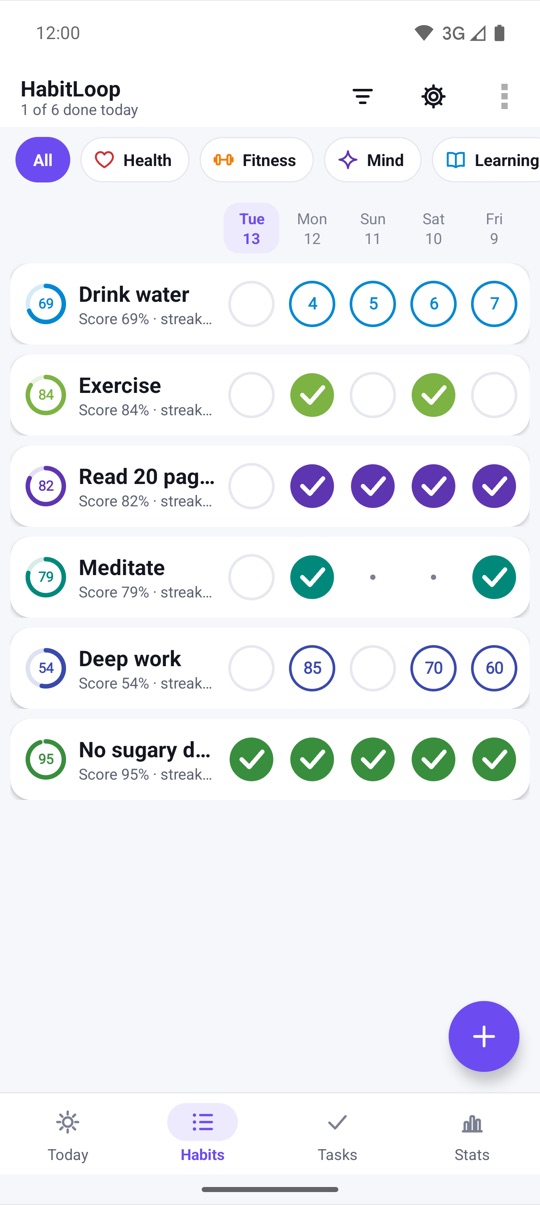
The Habits list can also be filtered by category, such as Health, Fitness, Mind and Learning, which helps once your list grows.
Days 1 to 3: attach the habit to a moment with an If-then plan
A habit without a "when" is easy to postpone forever. In the habit editor, scroll to Plan it and turn your habit into a sentence:
- When: tap a cue such as I wake up, I finish lunch or I get home, or type your own.
- Where (optional): "at the kitchen table", "in the park".
- Obstacle plan (optional): "If it rains, then I will do 20 squats."
The finished sentence shows up on Today in place of the schedule line, in the reminder notification and on the Today widget. So when the reminder fires, it doesn't just say the habit name; it reads your plan back to you.
You don't need a plan for every habit. Add one for the habit you're most likely to skip. If-then plans for habits has the details.
Days 1 to 7: check in with one tap, every day
The first week is about one thing: checking in. Don't worry about scores or charts yet.
HabitLoop gives you several places to check in, so you can use whichever is closest:
- The Today screen, which shows habits and tasks due today in one list, or on an hour-by-hour timeline.
- The Habits tab, one tap per day on each row.
- The home screen widget, a tap-to-check list.
- The reminder notification, with Done and Snooze buttons.
- A Wear OS watch, if you have one.
Every check-in shows a short Undo, so a mis-tap never costs you anything. For a measurable habit like water, you can set each tap to add one glass, and a snackbar confirms it, such as "+1 · 3 of 8".
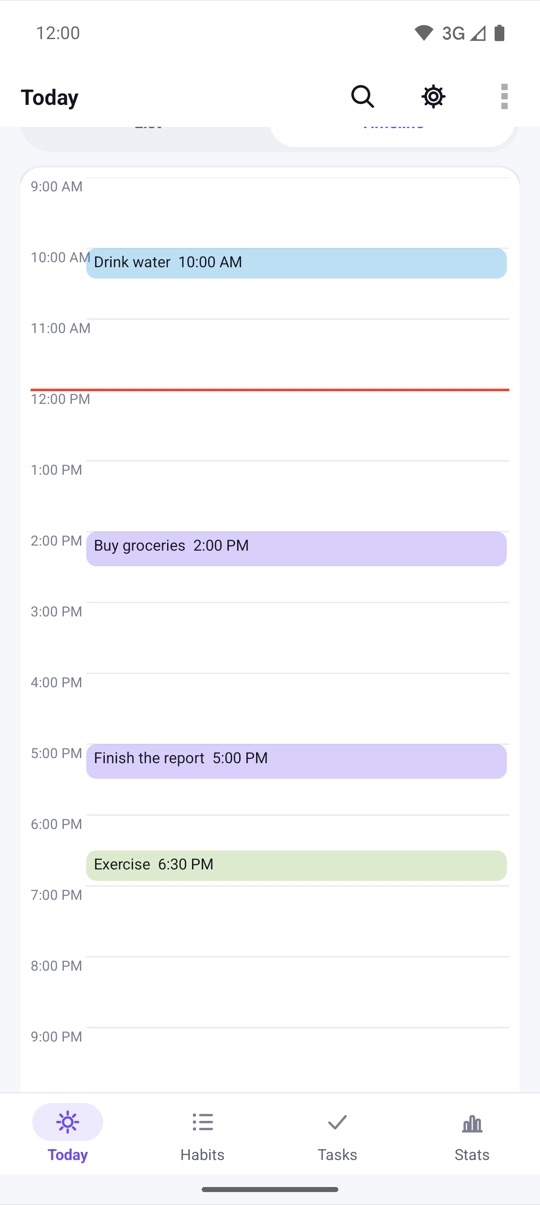
A practical tip: open HabitLoop at the same point each day, for example right after your first coffee, and look at Today. It takes a few seconds and keeps the list in front of you.
Week 1: add a focus timer to a habit that takes time
Some habits are about time spent: deep work, practice, study, reading. For those, give the habit a timer. Any habit can have a stopwatch, a countdown or Pomodoro rounds of work and breaks.
Start the timer, put the phone down, and do the work. The timer keeps running in the background, and when you finish, the minutes are logged to the habit for you. On a measurable habit that counts time, that fills in the day's value without typing.
If you're new to Pomodoro, a short countdown is a gentler start. The setup steps are in a focus timer for every habit.
Week 1: commit with a 21 or 30-day challenge
By the end of the first week you'll know which habit matters most to you. If you want a clear finish line, start a challenge on it. Open the habit's detail screen and choose 21, 30 or 66 days.
A ring then shows how many days are done and how many are left, for example 17 of 30 with 13 days to go. Milestones along the way are celebrated, and if a challenge stops fitting your life, Give up ends it without fuss.
Challenges sit inside a light game layer: XP for each check-in, task, focus session and routine, levels, and 21 badges. Every rule is shown on screen, and there's nothing to buy.
XP, badges, challenges and streak freezes lists every XP rule and badge.
Week 2: plan for bad days before they come
Week two is where habits usually wobble. The fix is to decide now what a bad day looks like, so it doesn't end the habit. HabitLoop has several tools for this, and it's worth setting them up while things are going well:
- Streak freezes. You get one per week and can hold two. If you miss a scheduled day, a freeze is used automatically and you get a notification saying so.
- Planned skip days and vacations. Plan a day off for one habit, or a vacation for all of them. Those days are paused, not missed, and streaks skip over them.
- Essential habits and Low-energy day. Mark the one or two habits you want to keep even on hard days as Essential. On a day when you're ill or exhausted, turn on Low-energy day on Today, and only essential habits stay due.
- Tiny version. In Gentle mode, a yes/no habit can be checked as a tiny version: one page, one push-up. It counts as showing up.
Gentle mode also hides streak numbers and red marks, and shows how often you showed up instead. If streaks make you anxious rather than motivated, try it. Gentle mode and low-energy days covers it in full.
Week 2: stack habits into a routine
If two or three of your habits happen at the same time of day, chain them. A routine turns habits that belong together into a step-by-step checklist, each step with its own timer if you want one. A morning routine might be: drink water, meditate, read.
Run the routine and HabitLoop shows one step at a time, with Done, Skip and Back, and a progress bar such as "Step 2 of 3".
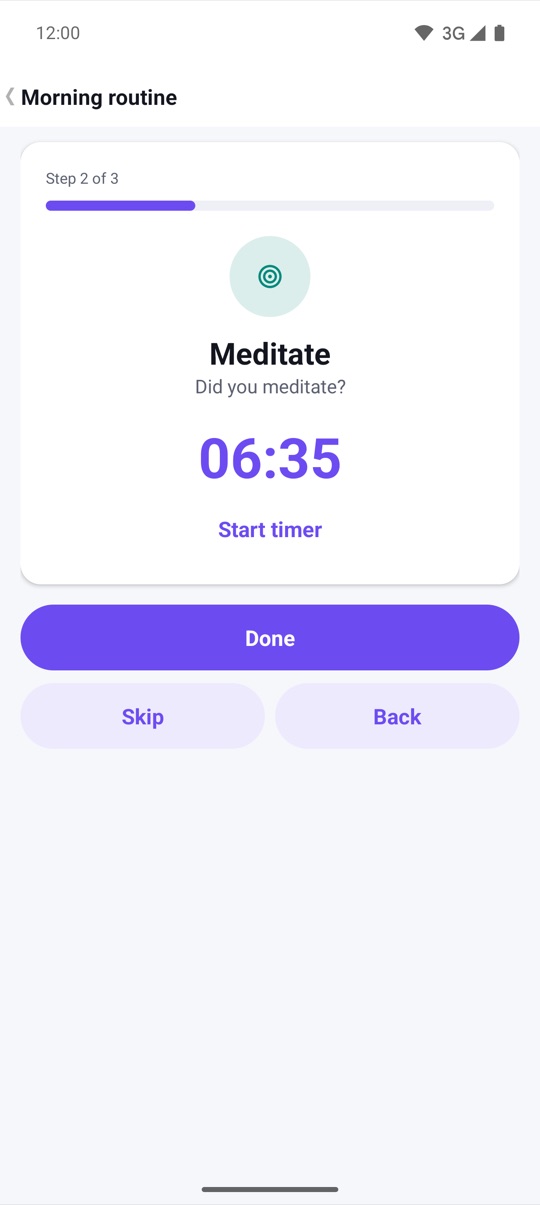
Stacking a new habit onto one you already do is a simple way to give it a fixed place in your day. Routines: stack habits and run them step by step shows how to build one.
Week 3: read your habit score and streak
By week three there's enough history to be worth reading. Tap a habit to open its detail screen. At the top you'll see four tiles:
- Score: a number from 0 to 100% that rises with each day you do the habit and dips a little on each due day you miss.
- Current streak: consecutive due days done, skipping planned rest days and vacations.
- Best streak: your longest run so far.
- Completion: the share of due days you actually did.
The score is the number to watch. A streak drops to zero after one miss; the score only dips, then recovers as you carry on. That's why one bad day in week three is not a reason to start over.
Further down the detail screen there's a one-year heatmap, monthly bars and a calendar. Tap any day in the calendar to fix a check-in you forgot. Reading your progress explains every number.
Week 4: review your first month in Stats
At the end of week four, open the Stats tab and tap 30D in the range row. You'll see your completion rate, number of check-ins and focus minutes, each compared with the previous period.
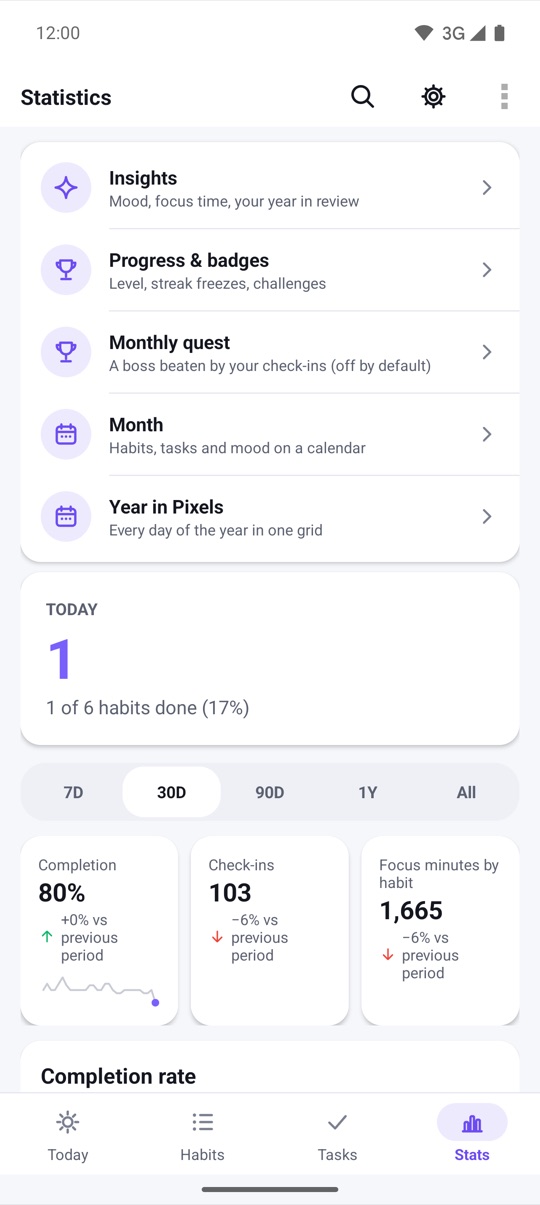
Scroll down for completion by weekday and by time of day. These tell you something practical: if your evening habits keep slipping and your morning ones don't, move a habit to the morning. HabitLoop also offers a weekly review every Sunday, a natural point to look back once a week rather than only at the end of the month.
Day 30: adjust, add one, or make a fresh start
After 30 days you have real information. Use it:
- The habit is going well. Keep it, and consider adding one more. Don't add three.
- The habit is half-working. Make it smaller, change its schedule, or add an If-then plan with an obstacle plan for whatever keeps getting in the way.
- The habit isn't working at all. Ask whether you still want it. If you do, use Fresh start for one habit on its detail screen: the streak and score count from today, and every past check-in stays in your history.
HabitLoop also offers small resets at natural moments, like a new week, month or year. See Fresh Start moments.
Any day: make HabitLoop comfortable to open
A small thing that helps: make the app pleasant to look at, especially if you check in at night. In Appearance you can choose one of 8 accent colours, turn on Pure black (AMOLED) for the dark theme, or match your wallpaper's colours.
Your first 30 days at a glance
- Day 1: set up, create one to three small habits with an honest schedule.
- Days 1 to 3: add an If-then plan to the habit you're most likely to skip.
- Days 1 to 7: check in every day from Today, the widget, a reminder or your watch.
- Week 1: add a timer to any habit that takes time; start a 21 or 30-day challenge on your key habit.
- Week 2: set up Essential habits, skip days and gentle mode if you want it; stack habits into a routine.
- Week 3: read the score, streaks and calendar on each habit's detail screen.
- Week 4: review 30 days in Stats.
- Day 30: keep, shrink, reschedule or fresh-start each habit, then add at most one more.
The phone cut
Here's the 25-second vertical version of the tour, handy to keep or share:
Both films, a Vietnamese version and every store screenshot are on the product page. For a scene-by-scene walkthrough, see HabitLoop in 40 seconds.
Watch on YouTube: HabitLoop feature tour · HabitLoop Short
HabitLoop is a habit tracker, not a medical or health app. If a habit involves exercise, diet, sleep or medication changes and you have a health condition, check with a doctor first.
FAQ
How many habits should I start with in HabitLoop?
One to three. HabitLoop has no habit limit, but a short list is easier to keep up in the first month. Add more once the first ones feel automatic.
What if I miss a day in the first month?
Your habit score dips a little and recovers as you continue. If you have a streak freeze, it's used automatically so your streak survives. Planned skip days and vacations don't count as missed at all.
Do I need an account or internet to follow this guide?
No. HabitLoop has no account system and no internet permission. Every step in this guide works offline, on Android 4.3 and newer.
Should I use a challenge or just a streak?
Both work. A streak keeps counting with no end; a 21, 30 or 66-day challenge gives one habit a fixed finish line with a progress ring. Many people start a 30-day challenge on their most important habit and leave the others as plain streaks.
I forgot to check in yesterday but I did the habit. Can I fix it?
Yes. Open the habit's detail screen, scroll to the calendar and tap the day to add the check-in.
Can I move my history from Loop Habit Tracker?
Yes. Export a backup from Loop and import it in HabitLoop under Data & backups. Your schedules come across with it.